How to Export Your Wealthsimple Activity for Tax Calculation
The ACB calculator reads the activities CSV that Wealthsimple exports from its Activity screen. Exporting takes a few minutes, and you upload the file to ActiveACB as it is. The adjusted cost base guide explains the rules the calculator applies.
Controls to click or set are outlined in red. Click any screenshot to see it full size.
Download Your Wealthsimple CSV
-
Log in at wealthsimple.com/en-ca.
-
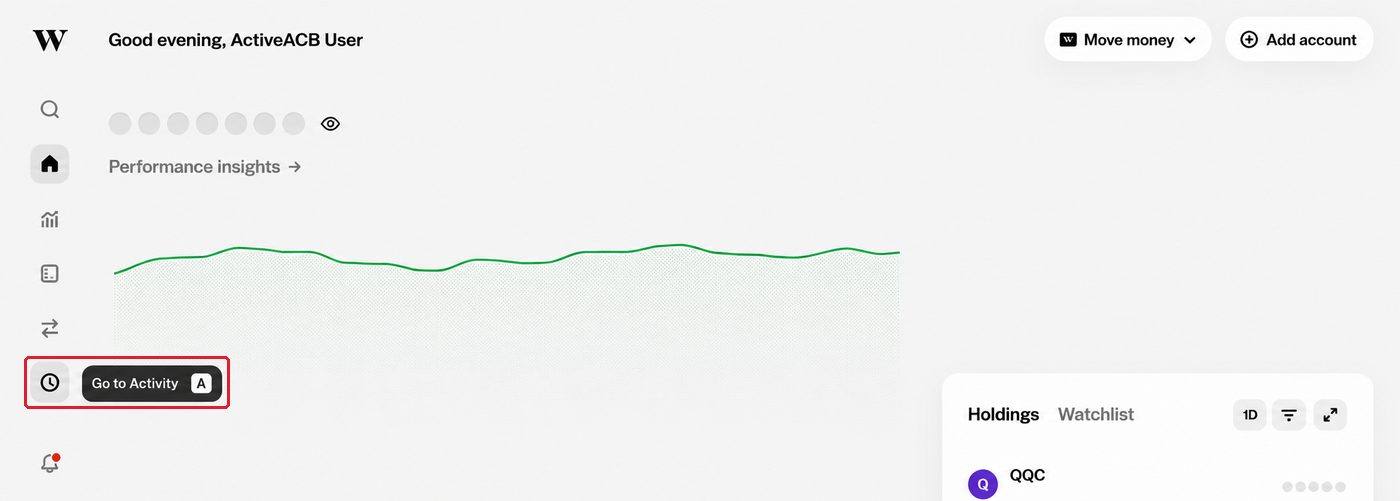
Click the Activity icon, the clock in the left sidebar.
-
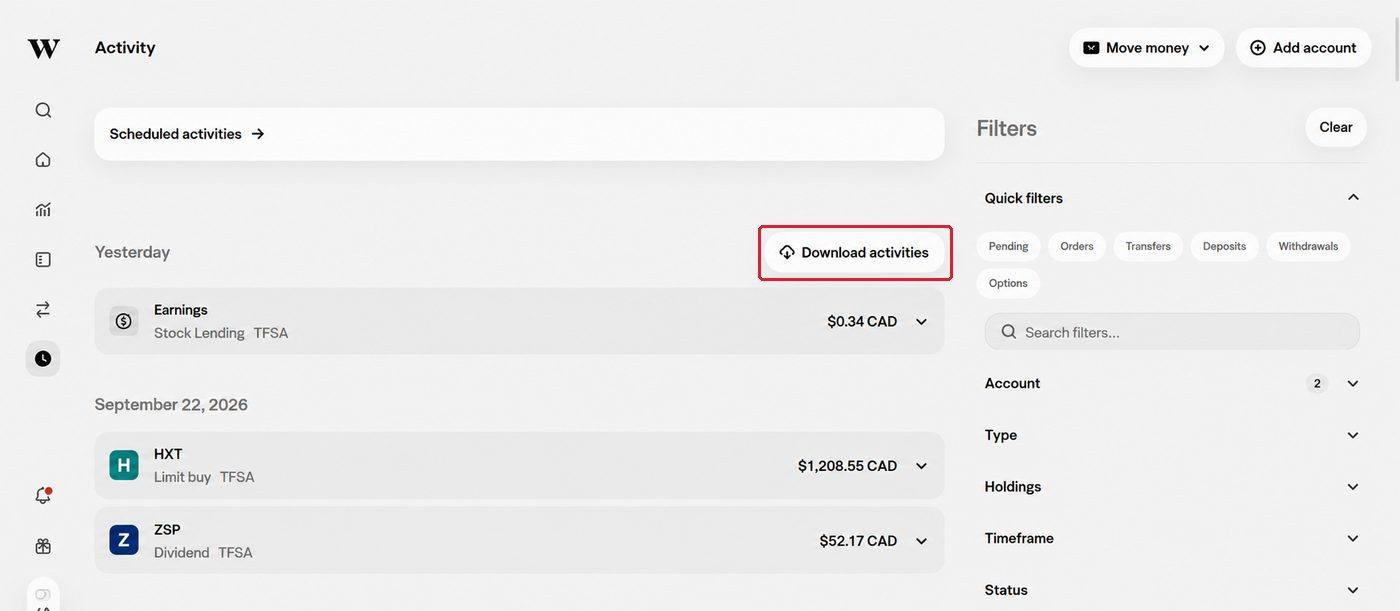
Click Download activities.
-
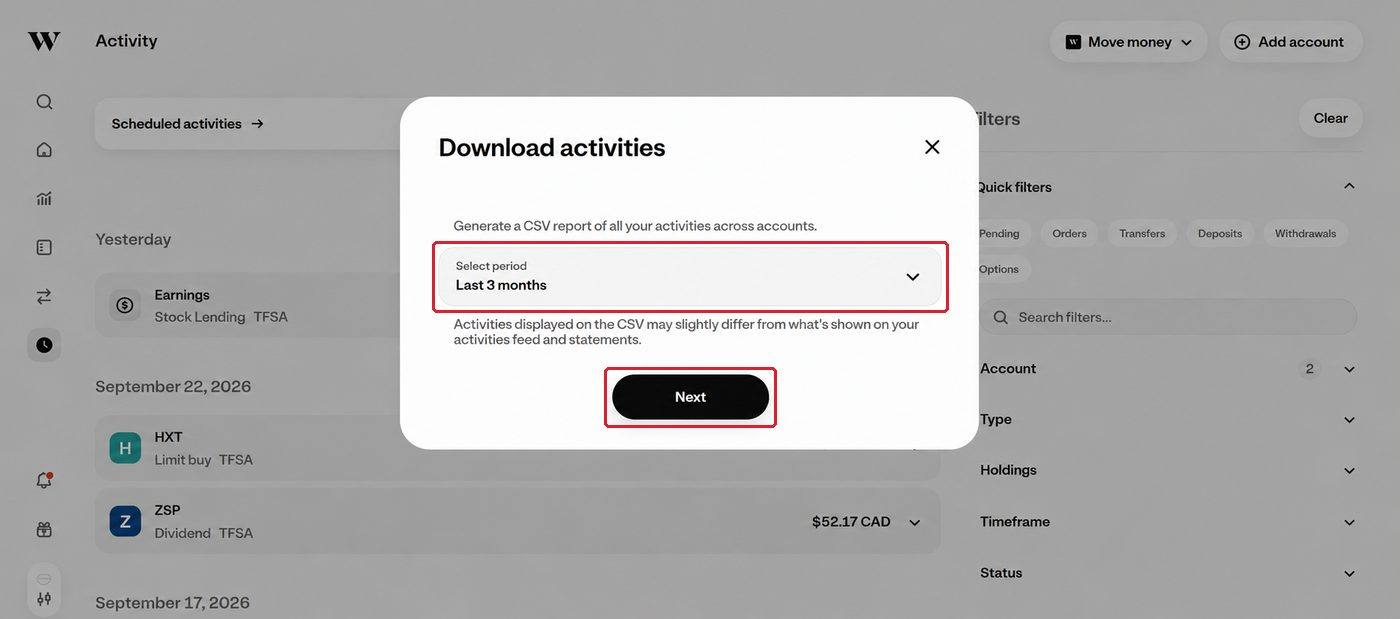
Open Select period and choose Custom. Start on your earliest investment date and end on December 31 of your tax year, or today for the current year. Important: an early start date lets the calculator see every purchase behind what you sold.
-
Click Next.
-
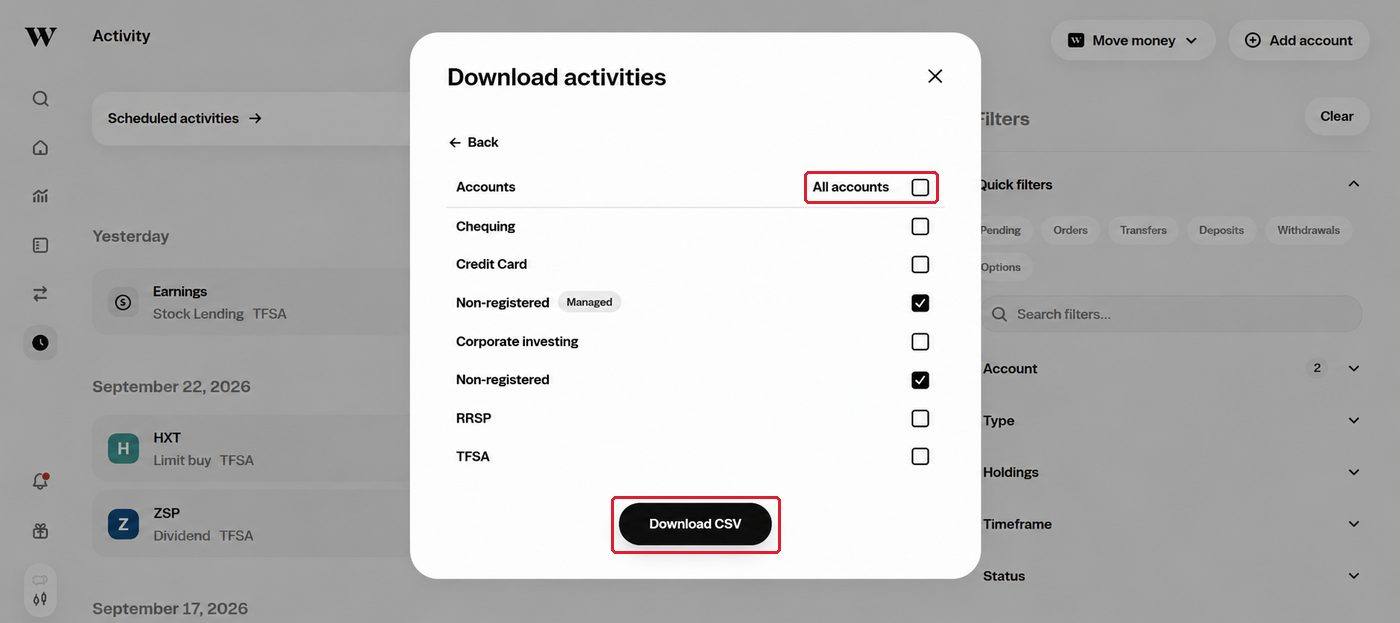
Tick All accounts. Registered accounts are left out of the calculation automatically.
-
Click Download CSV.
Check your file. The download is a CSV file ending in .csv. One file covers every account you ticked.
Upload to ActiveACB
-
Open the calculator.
-
Add the CSV file exactly as it downloaded. Important: do not open and save it in a spreadsheet program first. A re-saved copy has its dates rewritten, so ActiveACB asks for the original instead.
-
Run the calculation. Your trades, dividends, fees and other tax data are read automatically.
The engine excludes TFSA, RRSP and other registered account transactions from your capital gains calculation, and your results name each registered account it left out. Return of capital on the Canadian ETFs ActiveACB has tax factors for is applied as a reduction to your cost base under s. 53(2)(h) instead of being taxed as a dividend. For a fund without them, the export’s own return of capital and non-cash (reinvested) distribution entries adjust the cost base.
If This Applies to You
Sold at a loss in December? Important: end the period on January 30 of the following year so January repurchases are included. If your export has no activity after the end of the sale’s 30-day window, the results page flags the sale so you can check for a repurchase yourself.
Moved shares into a TFSA, RRSP or FHSA? Shares moved in kind from a taxable account into a registered one count as sold at their market value that day. The export gives no value for them, so your results name each one and ask you to enter it with the trade editor as a CONTRIBUTION row at the broker-recorded fair market value per share on the contribution date, in Canadian dollars and with zero commission. This action supports shares and fund units contributed to your own TFSA, RRSP, FHSA or RRIF. ActiveACB reports a gain and denies a loss on these contributions. Other plans or ownership arrangements need review.
Wealthsimple Crypto is not supported. Crypto is a separate product with different tax rules that ActiveACB does not currently handle. Those transactions are left out of the calculation, so if you traded crypto you will need to report it separately.
Holding accounts at more than one broker? With season access you can upload your Wealthsimple CSV alongside a Questrade XLSX or an IBKR Flex Query XML in the same session. The engine pools your ACB across all of them and detects superficial losses that span brokers.
Filing from your T5008? See why your Wealthsimple T5008 may not reflect your true ACB.
Which Wealthsimple tax slips should I expect?
For non-registered Wealthsimple accounts, tax slips depend on what the account earned or sold. Wealthsimple's own tax-season guide says non-registered accounts can receive a T5008 or RL-18 for securities sold, a T5 or RL-3 for interest and dividends, a T3 or RL-16 for trust and ETF distributions, and sometimes a T5013 or RL-15 for partnership income. Quebec residents often receive both the federal slip and the Releve slip for the same activity.
The timing is not identical for every slip. Wealthsimple lists T5008 and T5 slips near the end of February or early March, while T3 and T5013 slips are commonly later in March. Registered accounts follow their own contribution and withdrawal reporting, and their trades are not part of Schedule 3 ACB reporting while the investments remain inside the registered plan.
The activity CSV is still the better source for an ACB calculation. Slips summarize tax-reporting fields after year end. The CSV carries the transaction history, dates, quantities, currencies, fees, account labels, and registered-account rows that ActiveACB needs to pool positions correctly and exclude the accounts that do not belong on Schedule 3. For the slip accuracy issue, read the Wealthsimple T5008 guide.
The slip timing source is Wealthsimple's tax return preparation guide.
Prefer ActiveACB in your Google results. Add activeacb.ca as a preferred source and Google shows you more of our tax guides in your own search results.
Add ActiveACB in Google